Built for iOS · macOS · CLI · AI

Work on what
actually matters.

TaskBuddy brings the Eisenhower Matrix to life — a beautifully native app that helps you do the right things, not just more things. Across every device, even the terminal.

App Store Mac App Homebrew CLI
iOS & iPadOS macOS Native Widgets CLI + Homebrew iCloud Sync AI / MCP Server
TaskBuddy Q2 Strategy
TaskBuddy Hero
TaskBuddy Insights
The Eisenhower Matrix

Stop being busy.
Start being effective.

Presidents use it. CEOs swear by it. Now it's in your pocket. TaskBuddy's 4-quadrant system forces clarity — every task goes exactly where it belongs.

🔥
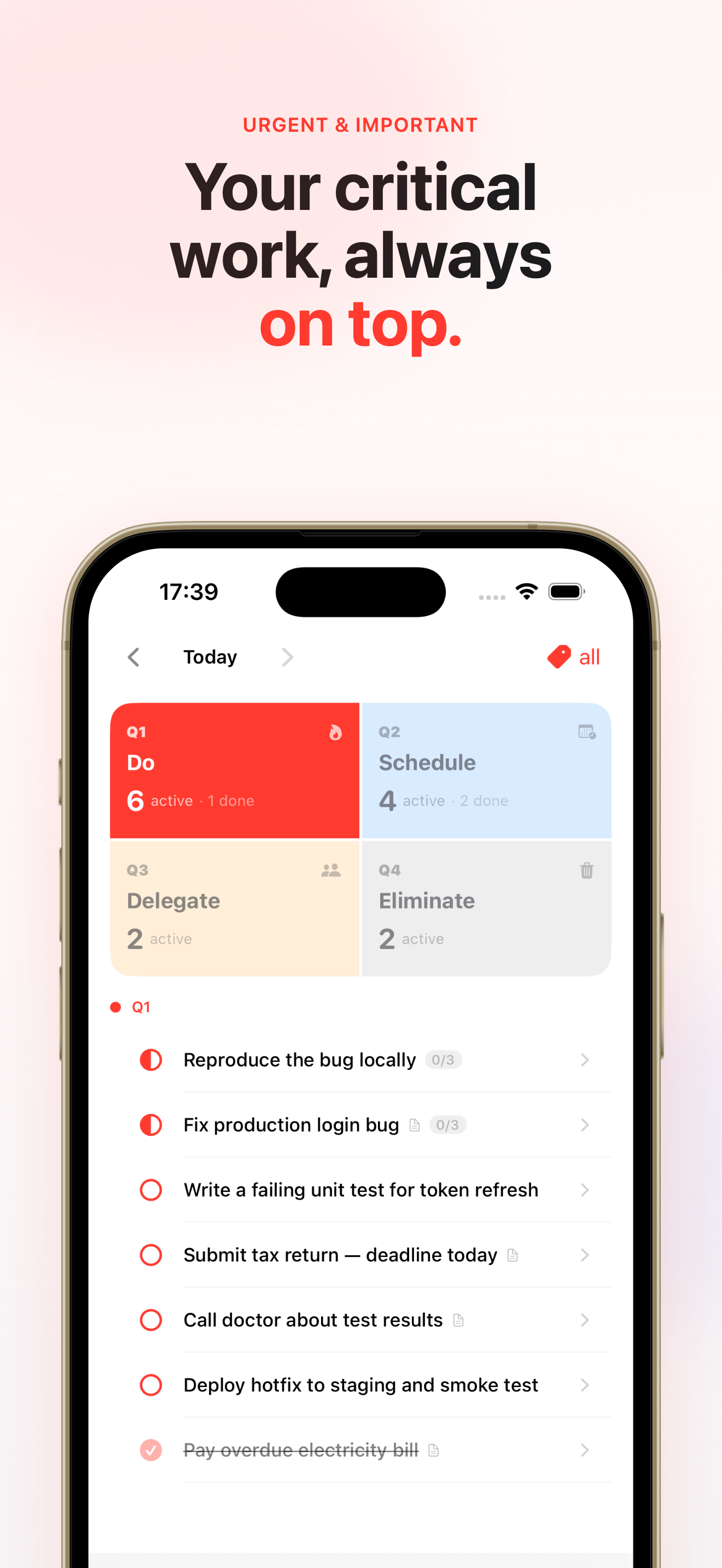
Q1 · Do

Important & Urgent

Crises, deadlines, fires. Handle these now — then work to prevent more from appearing here.

📅
Q2 · Schedule

Important, Not Urgent

Your growth zone. Strategy, learning, relationships. The most successful people live here.

👥
Q3 · Delegate

Urgent, Not Important

Interruptions and other people's priorities. Delegate or minimize — don't let these steal your day.

🗑️
Q4 · Eliminate

Not Important, Not Urgent

Time wasters. Acknowledge them, then decide: eliminate or schedule for downtime. Be ruthless.

← Not Urgent ↑ Important
↓ Not Important
Urgent →
Features

Everything you need.
Nothing you don't.

Thoughtfully crafted from the ground up for Mac and iOS. No subscriptions to basic features. No complexity for complexity's sake.

↕️

Fluid Drag & Drop Ordering

Rearrange tasks with a natural drag — within a quadrant or across all four. TaskBuddy's smart OrderCalculator keeps everything perfectly sorted, even when you shuffle dozens of tasks at once.

iOS Gestures macOS Handles Cross-Quadrant
🔗

Subtasks & Nested Hierarchy

Break any task into steps. Subtasks inherit context from their parent, and TaskBuddy gently confirms before completing a parent with active children — so nothing slips through the cracks.

Nested Tasks Smart Completion CLI Support
🏷️

Workspaces & Tags

Switch between Work, Personal, Side Project, or any context you define. Every view — quadrants, search, insights, widgets — filters to your active workspace instantly.

Multiple Projects Quick Switch Widget Filter
📊

Visualization & Insights

See the full picture with a productivity dashboard: completion rates, quadrant distribution charts, tag breakdowns, and a timeline of your output. Know exactly where your energy is going.

Overview Quadrant Chart Tag Analytics Timeline
🔍

Instant Search & Pinning

Full-text search across every task you've ever created — with recent query history. Pin critical tasks to float them above the noise, accessible with a single tap from anywhere.

Full-Text Pinned Items Search History
📱

Home Screen & Lock Screen Widgets

Your most important tasks, always visible — on iOS home and lock screens, macOS desktop. Configure by quadrant or workspace. Tap a task right from the widget to toggle it done.

iOS Widget macOS Widget Lock Screen Interactive
⌨️

Mac Global Hotkey Capture

A thought strikes while you're in another app? Hit your hotkey, a floating TaskBuddy panel appears instantly. Name the task, assign a quadrant, pick a date — done, back to what you were doing.

System-Wide Floating Panel macOS Only
🤖

AI Integration via MCP Server

Run taskbuddy mcp and your tasks become a tool that Claude, GPT, and any MCP-compatible AI can read, create, and manage. Your AI assistant finally knows what's on your plate.

Claude MCP Protocol Tool Discovery
☁️

Seamless iCloud Sync

Add a task on your iPhone, see it on your Mac in seconds. CloudKit handles sync automatically — no accounts to create, no third-party servers. Your data lives in your iCloud.

CloudKit Real-time Offline OK
📆

Calendar & Date Navigation

Tasks live on dates, not just lists. Navigate your history and future commitments with a graphical calendar. macOS sidebar groups tasks by Past, Today, and Upcoming for a full temporal view.

Date Picker Timeline View Mac Sidebar
📤

Export: JSON & Org-Mode

Your tasks are your data. Export everything to JSON with full metadata — or Org-mode for Emacs power users. Pipe it to scripts, sync to Notion, feed it to an AI. Fully portable, always.

JSON Org-mode Share Sheet
🔄

Rich Task Status System

Tasks move through Todo → In Progress → Done (or Delegated). Color-coded at a glance with SF Symbols. See active work instantly and never lose track of what's in-flight vs. waiting.

4 Statuses Color Coded Quick Toggle
In the Wild

See it in action

A native iOS experience that feels exactly like it belongs. Because it was built to.

4-Quadrant Home
Quadrant Home
Eisenhower Matrix
Eisenhower Matrix
Q1 Urgent Tasks
Critical Work First
Q2 Strategy
Plan Your Growth
Nested Subtasks
Nested Subtasks
Search & Pin
Search & Pin
Insights
Productivity Insights
Timeline
Momentum Timeline
TaskBuddy Pro
TaskBuddy Pro
More Features
And Much More
CLI & AI Integration

Your tasks,
in the terminal.
And in AI context.

TaskBuddy CLI, available via Homebrew, brings your task list to your workflow — not the other way around. Script it, pipe it, query it. And with the built-in MCP server, Claude and other AI assistants can read, add, and manage your tasks as first-class tools.

  • Homebrew install — one command, always up to date
  • JSON output flag — pipe to jq, scripts, and automations
  • MCP server — AI tool discovery for Claude, GPT, and more
  • Date range queries7d, 2w, 1m or specific ISO dates
  • Full CRUD — add, complete, delete, note, search, tag
taskbuddy — zsh
# Install via Homebrew
$ brew install taskbuddy
 
# Add a Q1 task for today
$ taskbuddy add -q1 "Ship the landing page"
Task added to Q1 (Do) · today
 
# List today, JSON output
$ taskbuddy list --json | jq '.[] | .headline'
"Ship the landing page"
"Review Q2 strategy doc"
 
# Start MCP server for AI tool use
$ taskbuddy mcp
⚡ MCP server listening
Tools: list_tasks, add_task,
complete_task, search_tasks,
add_note, delete_task …
Ready for Claude / AI agents
 
$
Ecosystem

One brain,
every surface.

TaskBuddy lives natively on every Apple platform, with a CLI that meets you in the terminal and an AI bridge that fits any workflow.

📱

iOS & iPadOS

Native SwiftUI. Fluid gestures, dynamic type, dark mode. Your quadrants always one tap away.

🖥️

macOS

Split-view sidebar, global hotkey, Mac menu integration. Designed for deep work sessions.

🔲

Widgets

Home screen, lock screen, desktop. Filter by quadrant or workspace. Tap to complete.

⌨️

CLI + AI

Homebrew-installable. Full CRUD in the terminal. MCP server for AI assistant integration.

☁️

Everything stays in sync — automatically.

TaskBuddy uses Apple's CloudKit to sync your tasks across iPhone, iPad, and Mac in real-time. No account creation. No third-party cloud. No subscription required for sync. Your data lives in your iCloud — private, fast, and always available, even offline.

Visualization

Understand your
productivity patterns.

The Insights dashboard gives you an honest read on where your time goes — by quadrant, by tag, over time. Data that makes you better.

Productivity Overview
Momentum Timeline
Momentum Timeline
Search & Pin
Search & Pin
4
Quadrants to clarify any task
7
MCP tools for AI integration
Workspaces & tags
0
Third-party servers — pure iCloud
Get Started

Start working on what matters.

Download TaskBuddy for free on iPhone, iPad, and Mac. Or install the CLI with a single Homebrew command. Your quadrants are waiting.